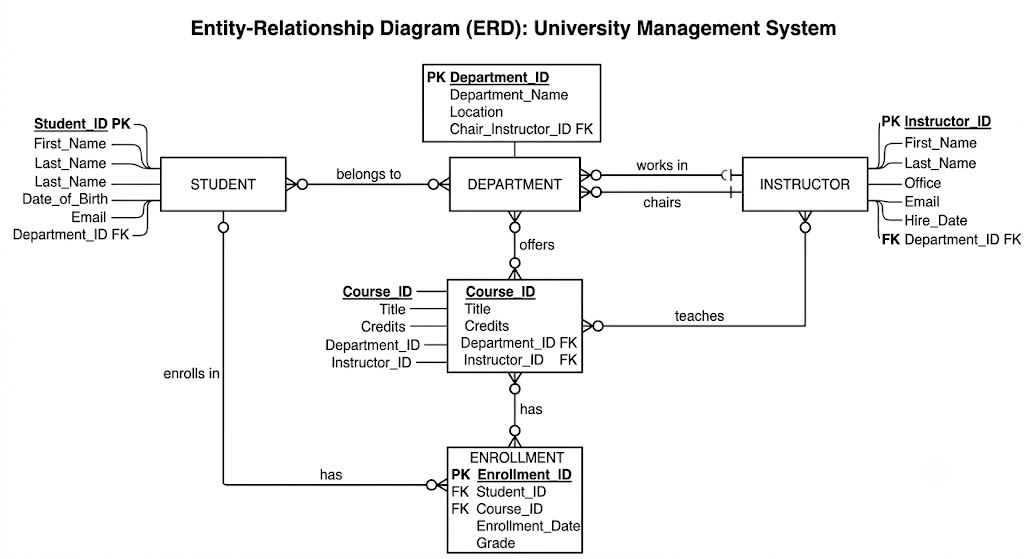
Think of an ER Diagram (Entity-Relationship Diagram) as a blueprint or a visual map for a database. Just like a floor plan shows how rooms in a house connect, an ER Diagram shows how different pieces of information in a System connect to each other.
If you were building an app like Spotify, Instagram, or a school management System, you would use an ER Diagram to plan out how the Data fits together before you start writing code.
There are three main building blocks you Need to know: Entities, Attributes, and Relationships.
1. Entities (The “Things”)
An entity is an object, place, or concept that you want to store information about. Think of it as a noun. In a diagram, entities are drawn as rectangles.
- Examples for a School System:
Student,Teacher,Classroom. - Examples for Social Media:
User,Post,Comment.
2. Attributes (The “Details”)
Attributes are the specific pieces of information that Describe an entity. Think of them as adjectives. In traditional ER diagrams, these are drawn as ovals connected to their entity.
Every entity usually has a special Attribute called a Primary Key (like a Student ID or a Username) that uniquely identifies it so no two records get mixed up.
- Attributes for a
Studententity:StudentID(Primary Key),FirstName,LastName,Email.
3. Relationships (The “Connections”)
Relationships show how two entities interact with each other. Think of them as verbs. In diagrams, these are traditionally drawn as diamonds connecting the rectangles.
- A
Studentenrolls in aCourse. - A
Teacherteaches aClass.
Cardinality: How many connect to how many?
Relationships also show the rules of the System, known as cardinality. There are three main types:
- One-to-One (1:1): Each item on one side connects to exactly one item on the other.
- Example: A
Studenthas exactly oneStudentDesk, and that desk belongs to only that student.
- Example: A
- One-to-Many (1:N): One item on one side can connect to multiple items on the other.
- Example: One
Teachercan teach many differentClasses, but each class only has one official teacher.
- Example: One
- Many-to-Many (M:N): Multiple items on both sides can connect to each other.
- Example: A
Studentcan take manyCourses, and aCoursehas manyStudentsenrolled in it.
- Example: A
Putting It All Together: A Quick Example
Imagine we are designing a simple System for a school’s library:
- Entities: We have
StudentandBook. - Attributes: The
Studenthas aLibraryCardNumber, and theBookhas anISBN_Number. - Relationship: A
Studentborrows aBook. - Cardinality: One student can borrow many books at once, so it’s a One-to-Many relationship from Student to Books.
By drawing this out first, developers know exactly how to build the database tables without getting confused about how the Data interacts!