At its core, Match Between System and the Real World is about speak the user’s language. It states that an interface should use words, phrases, and concepts familiar to the user, rather than internal developer jargon or technical shorthand. Furthermore, it means information should appear in a natural, logical order that mirrors real-world human habits and physical Conventions.
When software forces people to adapt to its internal engineering structure rather than adapting to human intuition, it introduces unnecessary cognitive load. The most intuitive interfaces feel invisible because they seamlessly extend concepts the user already understands from their daily life.
3 Core Pillars of the Real-World Match
To build a Design that matches the user’s mental Model, you Need to align three key areas:
1. Language and Terminology
Avoid developer-speak, database field names, or System-centric jargon. Speak the exact language your specific audience uses in their daily life or profession.
- Digital Patterns: Descriptive button actions, human-readable error messages, clear tooltips.
- Everyday Example: A banking app using the phrase “Pay someone” or “Transfer money” instead of “Execute ACH Transaction Initiation.”
2. Metaphors and Visual Iconography
Leverage physical objects from the real world to help users instantly grasp digital functionality. By mirroring the appearance and Function of a physical tool, users instantly know how to interact with the digital equivalent.
- Digital Patterns: Desktop folders, trash cans, magnifying glasses for search, switches for toggles.
- Everyday Example: A digital reading app like Apple Books mimicking the layout of a physical bookshelf and using a page-turning animation to navigate a chapter.
3. Conceptual Logic and Workflows
The sequence of actions inside a piece of software should follow the logical order of the real-world task it is replacing.
- Digital Patterns: Step-by-step wizard forms, logical content hierarchies, left-to-right reading alignment for sequential tasks.
- Everyday Example: An Online booking System that asks you where you want to go and when before asking for your seat preference or credit card details.
Real-World Examples: The Good vs. The Bad
Let’s look at how this principle affects Usability in production environments.
The Good: Skeuomorphic Traces in Modern Design
While the era of hyper-realistic 3D textures (skeuomorphism) has faded, the functional metaphors remain vital. Think about digital audio production software (DAWs) like Logic Pro or GarageBand. They feature dials, sliders, and audio waves that mimic physical mixing desks and tape reels.
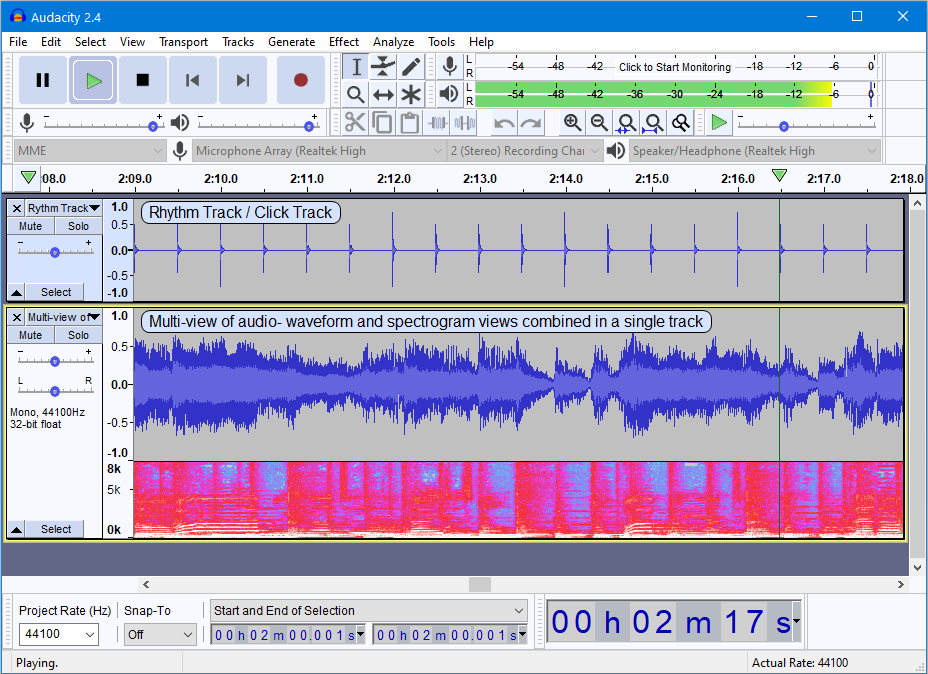
Because the digital controls look and act like physical dials that audio engineers have twisted for decades, the learning curve drops to near zero for professionals.
The Bad: Engineering-Centric Interfaces
Imagine setting up a smart home device, and instead of asking you to choose a room like “Kitchen” or “Living Room,” the app forces you to assign it to Location 1.3.2
Another classic failure is displaying System errors directly to the end-user. If a database timeout occurs, showing a popup that reads “Error: NullPointerException at line 402, java.lang.Null” means absolutely nothing to a regular person. It exposes the underlying technology rather than translating the problem into a human-centered statement, like: “We’re having trouble connecting to our Servers right now. Please try again in a few minutes.”
Further Reading & Deep Dives
To Explore how Mental models shape user interaction and why mapping interfaces to human intuition is a foundational Design law, check out these deep dives:
- For the official principles and detailed Case studies on this Heuristic, read the Nielsen Norman Group’s Guide to Match Between System and the Real World.
- To understand the broader cognitive science principle behind why users expect your System to work like everything else they know, Explore the Guide on Jakob’s Law of Internet User Experience.
Practice Questions & Quick Quiz
Test your ability to spot and fix real-world alignment issues with these scenarios.
Question 1
An e-commerce app requires users to input their Address. The form fields are arranged in this order: Postcode, Country, Street Number, City, Apartment Number. Which aspect of the real-world match is this violating?
- Answer Key: It violates Conceptual Logic and Workflows. While all the necessary Data fields are present, the order completely breaks the standard Convention of how people write, read, or think about their physical Address, causing confusion and form completion errors.
Question 2
True or False: Using a floppy disk icon to represent “Save” is technically a violation of this Heuristic for younger generations, yet it remains highly effective.
- Answer Key: True. This is a unique exception known as an inherited metaphor. While most modern users have never handled a physical floppy disk, the industry standard is so deeply ingrained that the icon has evolved into a universal symbol for saving, proving that established digital Conventions can sometimes override literal physical matches.
Practical Activities & UX Challenges
Apply this Heuristic by evaluating existing applications and redesigning a common technical flow.
Activity 1: The “Jargon Hunt” Audit
Find a Complex settings menu, developer tool, or corporate software platform (such as a router configuration page, cloud hosting panel, or Advanced spreadsheet settings).
- Task: Scan the interface to Identify at least three instances of technical jargon, confusing abbreviations, or System-centric logic that a non-technical person would struggle to understand.
- Deliverable: Rewrite those three instances into plain, conversational language that focuses entirely on the goal the user is trying to accomplish, rather than how the System processes it.
Activity 2: Redesigning the E-Commerce “Filter” Experience
Imagine you are building a website for a local timber merchant or a hardware store selling materials to DIY enthusiasts who are building backyard projects. Currently customers search for the type of material (wood, plastic, metal), cost, and colour.
- Task: Wireframe or sketch a “Filter & Search” sidebar for this website.
- Requirements: Redesign these database-driven attributes into clear, real-world categories that match the mental Model of a weekend DIYer who just wants to build a deck or an outdoor garden bed. Translate the technical specs into real-world utility choices (e.g., “Good for outdoor use,” “Ground contact safe,” or “Easy to cut”).