Serving Static files like CSS stylesheets in a web framework is slightly different from doing it in pure HTML. Because Flask manages paths dynamically, it uses a built-in Function called URL_for to safely locate and link your Static assets.
Here is a step-by-step Guide to setting up, organising, and linking a CSS file to your Flask templates.
Part 1: Setting Up the Directory Structure
Flask has a strict Convention for where it looks for assets. All public-facing files—like CSS, JavaScript, and images—must live inside a root folder named Static.
Update your Project folder layout to look like this:
Plaintext
my_flask_app/
│
├── app.py
├── Static/
│   └── css/
│       └── style.css      <--- Your stylesheet goes here
└── templates/
    ├── base.html          <--- Layout blueprint
    └── index.html         <--- Child template
Part 2: Writing and Linking the CSS
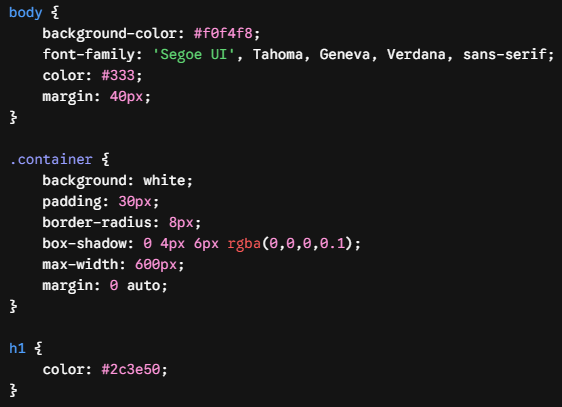
1. Create Your Stylesheet (Static/css/style.css)
Add some Basic styling to verify everything connects properly:
CSS
body {
    background-color: #f0f4f8;
    font-family: 'Segoe UI', Tahoma, Geneva, Verdana, sans-serif;
    color: #333;
    margin: 40px;
}

.container {
    background: white;
    padding: 30px;
    border-radius: 8px;
    box-shadow: 0 4px 6px rgba(0,0,0,0.1);
    max-width: 600px;
    margin: 0 auto;
}

h1 {
    color: #2c3e50;
}
2. Link the CSS in the Base Template (templates/base.html)
Instead of hardcoding a traditional path like href="../Static/css/style.css", use Flask’s Jinja syntax with URL_for.
URL_for('Static', filename='...') tells Flask to look inside the Static folder, and then you map the relative path to your file from there.
HTML
<!DOCTYPE html>
<html lang="en">
<head>
    <meta charset="UTF-8">
    <meta name="viewport" content="width=device-width, initial-scale=1.0">
    <title>{% block title %}My Flask App{% endblock %}</title>

    <link rel="stylesheet" href="{{ URL_for('Static', filename='css/style.css') }}">

</head>
<body>

    <div class="container">
        {% block content %}
        {% endblock %}
    </div>

</body>
</html>
3. Build the Child Template (templates/index.html)
Because index.html inherits from base.html, it automatically receives the linked stylesheet without you needing to declare the <link> tag again.
HTML
{% extends 'base.html' %}

{% block title %}Home - CSS Test{% endblock %}

{% block content %}
    <h1>Styling Successful!</h1>
    <p>This content is inside a styled container using an external CSS stylesheet linked via Flask's <code>URL_for</code> Function.</p>
{% endblock %}
Part 3: Troubleshooting CSS in Flask
If you run your application and your styles aren’t showing up, check these two common culprits:
1. Browser Caching (The “Hard Refresh” Trick)
Web browsers aggressively cache CSS files to save bandwidth. If you change your CSS file and reload the page, the browser might keep using the old, cached version.
- The Fix: Force a hard refresh to clear the cache for that page.
- Windows/Linux: Press
Ctrl+F5orCtrl+Shift+R - Mac: Press
Cmd+Shift+R
- Windows/Linux: Press
2. Broken Path Syntax
Ensure you have the quotes exactly right inside your Jinja tags. A common mistake is nesting the same type of quotes, which breaks the String:
- Wrong:
href='{{ URL_for('Static', filename='css/style.css') }}'(If wrapped in matching outer single quotes) - Right:
href="{{ URL_for('Static', filename='css/style.css') }}"(Outer double quotes, inner single quotes)