In Flask, template inheritance is one of the most powerful features of the Jinja2 template engine. It allows you to create a single “master” layout (a base blueprint) containing your site’s common structure—like the HTML skeleton, navigation bar, and footer—and then inherit and override specific sections in your child templates.
This prevents code duplication and makes site-wide updates incredibly easy.
Part 1: How Template Inheritance Works
Think of template inheritance like a puzzle. The Base Template provides the frame and the solid pieces that never change, while leaving empty slots (called blocks). The Child Template simply fills in those specific slots with unique content.
Plaintext
+-----------------------------------+
|          BASE TEMPLATE            |
|  [ Navbar / Header ]              |
|                                   |
|  +-----------------------------+  |
|  |  {% block content %}        |  |  <--- Child template injects
|  |  (Unique page content here) |  |       its unique code here.
|  |  {% endblock %}             |  |
|  +-----------------------------+  |
|                                   |
|  [ Footer ]                       |
+-----------------------------------+
Part 2: Step-by-Step Implementation
We will expand on a standard Flask Project structure by creating a skeleton layout (base.html), a home page (index.html), and an about page (about.html).
1. Project Directory Structure
Ensure your files are organised like this inside your Project folder:
Plaintext
my_flask_app/
│
├── app.py
└── templates/
    ├── base.html
    ├── index.html
    └── about.html
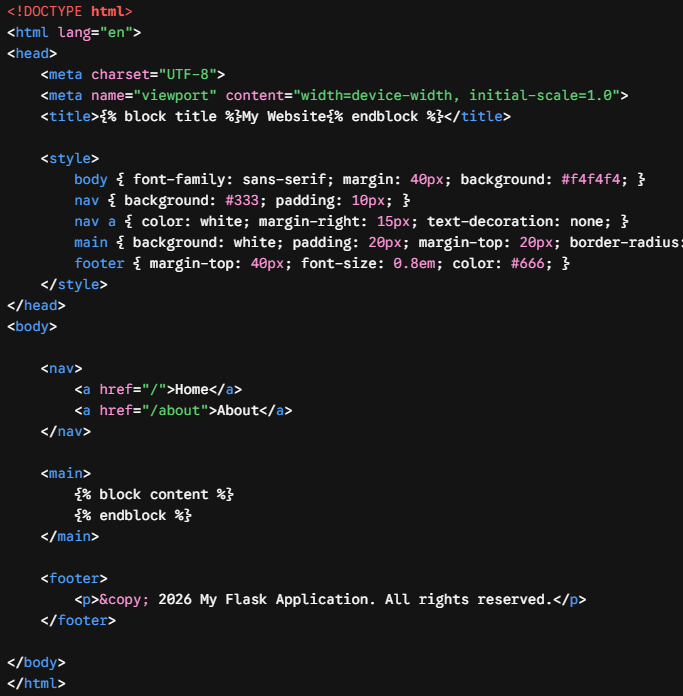
2. Create the Base Template (base.html)
This file defines the boilerplate HTML structure that every page on your site will share. We use {% block block_name %} and {% endblock %} to mark the areas that child templates can modify.
HTML
<!DOCTYPE html>
<html lang="en">
<head>
<meta charset="UTF-8">
<meta name="viewport" content="width=device-width, initial-scale=1.0">
<title>{% block title %}My Website{% endblock %}</title>
<style>
body { font-family: sans-serif; margin: 40px; background: #f4f4f4; }
nav { background: #333; padding: 10px; }
nav a { color: white; margin-right: 15px; text-decoration: none; }
main { background: white; padding: 20px; margin-top: 20px; border-radius: 5px; }
footer { margin-top: 40px; font-size: 0.8em; color: #666; }
</style>
</head>
<body>
<nav>
<a href="/">Home</a>
<a href="/about">About</a>
</nav>
<main>
{% block content %}
{% endblock %}
</main>
<footer>
<p>© 2026 My Flask Application. All rights reserved.</p>
</footer>
</body>
</html>
3. Create the Child Templates
Child templates use the {% extends 'base.html' %} tag at the very top of the file to link themselves to the layout.
templates/index.html (The Home Page)
HTML
{% extends 'base.html' %}

{% block title %}Home - My Website{% endblock %}

{% block content %}
    <h1>Welcome to the Homepage</h1>
    <p>This specific text is injected right into the middle of the base template layout!</p>
{% endblock %}
templates/about.html (The About Page)
HTML
{% extends 'base.html' %}

{% block title %}About Us - My Website{% endblock %}

{% block content %}
    <h1>About Our Team</h1>
    <p>We are building clean, scalable web applications using Python and Flask.</p>
{% endblock %}
4. Update Your Flask Application (app.py)
Now, set up your Python routes to render these distinct child templates. Flask handles stitching them together automatically behind the scenes.
Python
from flask import Flask, render_template

app = Flask(__name__)

@app.route('/')
def home():
    # Flask renders index.html, which automatically pulls in base.html
    return render_template('index.html')

@app.route('/about')
def about():
    # Flask renders about.html, which also pulls in base.html
    return render_template('about.html')

if __name__ == '__main__':
    app.run(debug=True)
Part 3: Pro-Tips for Template Inheritance
- Super Blocks (
{{ super() }}): If you want to pull in content from the base template’s block and add new content to it rather than completely overwriting it, use{{ super() }}inside the child block. This is incredibly useful for appending page-specific scripts or CSS stylesheets. - Keep Blocks Clean: Give your blocks distinct, logical names (e.g.,
{% block scripts %},{% block sidebar %}). You can have as many blocks in your base template as your layout requires.